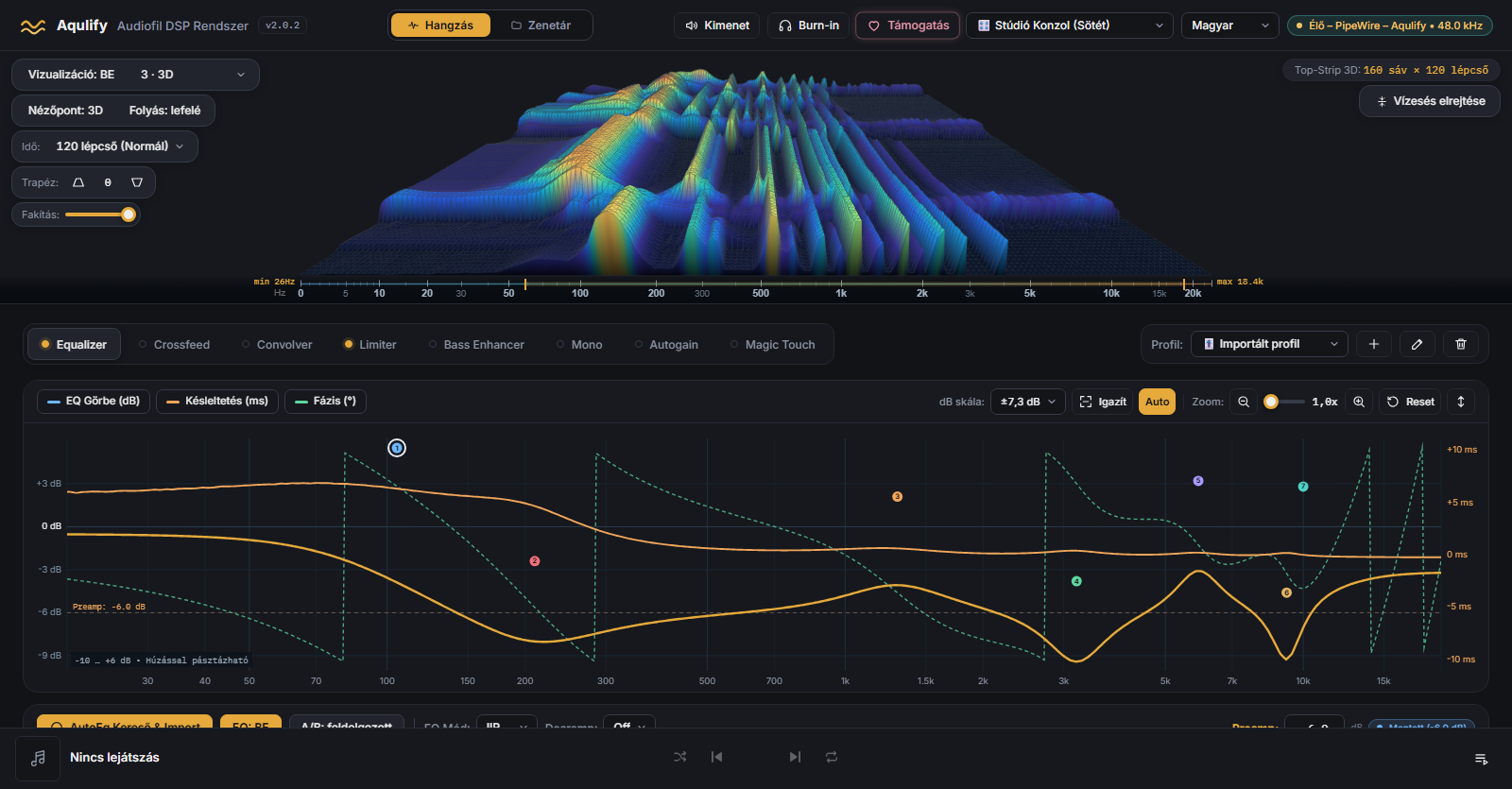
Live 3D waterfall
The real spectrum of the played signal, in 160 bands, at up to 60 frames per second. The engine computes it, the interface draws it.
DetailsFree · open source (GPL-3.0) · Windows · macOS · Linux
Parametric EQ, impulse response, live 3D spectrum. Works system-wide, on the sound of any player.
The installers are not code-signed yet, so Windows and macOS may show a warning. Guide →
In brief. Every detail has its own page.
The real spectrum of the played signal, in 160 bands, at up to 60 frames per second. The engine computes it, the interface draws it.
DetailsUp to 32 bands, four processing modes, and search and import of more than 8,850 headphone profiles.
DetailsThe EQ curve, phase and delay are computed with the same filters that process the sound.
DetailsLoad and preview a WAV or IRS impulse response; the program keeps the impulse responses belonging to your profiles.
DetailsA restrained automatic enhancer, plus limiter, crossfeed and bass enhancer. Each can be switched on and off separately.
DetailsPink, brown and white noise at a controlled level, with fades. While it runs the other modules are off, then restored.
DetailsFLAC, MP3, Opus, ALAC and more through the Aqulify chain; albums, covers, play queue and lists.
DetailsOn Linux as a virtual output, on Windows as an Equalizer APO plugin, on macOS as a menu-bar app, processing the audio being played.
DetailsFiles come from the GitHub releases, always the latest version.
A single installer: it detects or downloads Equalizer APO and places the plugin at the end of the chain. 64-bit Windows 10 and 11.
Download Checksum (SHA-256)One app for Apple Silicon and Intel Macs; the engine runs in the menu bar.
Download Checksum (SHA-256)A source package with an install script: on Ubuntu / Debian, Fedora, Arch and openSUSE it detects the package manager and builds on your machine.
mkdir -p ~/Aqulify && cd ~/Aqulify && curl -fsSL https://github.com/Szorgos/ee-phase-waterfall-analyzer/releases/latest/download/Aqulify-Linux.tar.gz | tar -xz --strip-components=1 && ./install.shA ready-made RPM package for Fedora and RHEL (x86_64), and from the COPR repository for x86_64 and aarch64, with automatic updates.
sudo dnf copr enable nlali/aqulify
sudo dnf install aqulifyThe installers are not code-signed yet, so Windows and macOS may show a warning. Installation guide →
Every feature is usable without limits. If you find it useful, a voluntary donation supports development.